No description
- QML 76.3%
- Shell 13.7%
- Python 3.2%
- JavaScript 2.9%
- Lua 1.7%
- Other 2.2%
 Vkw2920
7bdfa8ff77
Vkw2920
7bdfa8ff77
Some checks failed
Comment on Discussion When sdata/dist-arch/ Changes / comment_on_discussion (push) Has been cancelled
|
||
|---|---|---|
| .config/quickshell/ii/scripts/gpu | ||
| .github | ||
| dots | ||
| dots-extra | ||
| licenses | ||
| sdata | ||
| .gitignore | ||
| .gitmodules | ||
| diagnose | ||
| LICENSE | ||
| setup | ||
【 end_4's Hyprland dotfiles 】




• overview •
Warning
Hyprland 0.55 update: If your distro has not shipped Hyprland 0.55 and/or you're not ready for it, you should switch to the Pre-Hyprland Luaification release (or not update yet, if you're going to do that). See the wiki for more info: Install | Update
What this is/isn't
- Technically, configuration files
- Realistically, mostly the custom graphical shell
- NOT a system setup script: no graphic drivers, no zram setup, etc.
Notable features
- Overview: Shows open apps with live previews
- AI: Gemini, Ollama, and more
- QoL: screen translation, anti-flashbang, Google Lens
- Material themes: Choose your wallpaper, done, enjoy
- Transparent installation: Every command is shown before it's run
Installation
- IMPORTANT: Hyprland 0.55 Update: If your distro has not shipped Hyprland 0.55 and/or you're not ready for it, you should switch to the Pre-Hyprland Luaification release. See the wiki for more info
- Just run
bash <(curl -s https://ii.clsty.link/get)- Or, clone this repo and run
./setup install - See the wiki for more details
- Or, clone this repo and run
- Keybinds: Should be somewhat familiar to Windows or GNOME users. Important ones:
Super+/= keybind listSuper+Enter= terminal
Software overview
| Software | Purpose |
|---|---|
| Hyprland | The compositor (manages and renders windows) |
| Quickshell | A QtQuick-based widget system, used for the status bar, sidebars, etc. |
| Others | See deps-info.md |
Discord
Server link | I hope this provides a friendlier environment for support without needing me to personally accept every friend request/DM. For real issues, prefer GitHub• screenshots •

Widget system: Quickshell | Support: Yes
| AI, settings app | Some widgets |
|---|---|
| Window management | wow look its orange |
• thank you •
- @clsty for making the dotfiles accessible by taking care of the install script and many other things
- @midn8hustlr for greatly improving the color generation system
- @outfoxxed for being extremely supportive in my Quickshell journey
- Quickshell: Soramane, FridayFaerie, nydragon
- AGS: Aylur, kotontrion
- EWW: fufexan
• stonks •
- I promise not to attempt an +ULTRARICOSHOT irl... Coins can go here: https://github.com/sponsors/end-4
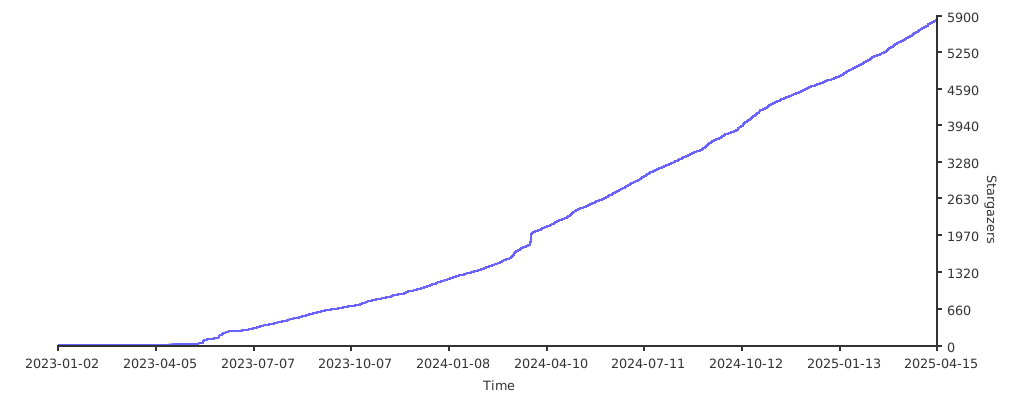
- Tentacle cat hub twinkle internet points
• previous styles •
- Unsupported!
- Source: illogical-impulse AGS in
ii-agsbranch, others inarchivebranch. - List is in reverse chronological order
illogical-impulse (AGS)
Widget system: AGS | Support: No
| AI | Common widgets |
|---|---|
| Window management | Weeb power |
m3ww
Widget system: EWW | Support: No
NovelKnock
Widget system: EWW | Support: No
Hybrid
Widget system: EWW | Support: No
Windoes
Widget system: EWW | Support: No
• inspirations/copying •
- Inspiration: osu!lazer (Hybrid), Windows 11 (Windoes), AvdanOS (NovelKnock), Material Design 3 (m3ww & later)
- Copying: Absolutely, feel free. Just follow the license and it's all good